
Found
How to Redesign or Migrate a Website Without Losing SEO
Protect valuable pages, plan redirects, and check the SEO details that can get lost during a redesign.

Webshunya Team
·
10 min read

OVERVIEW
Migrate a Website Without Losing SEO in small words
To reduce SEO risk during a website redesign or migration, first identify what is changing and protect the pages that already bring useful traffic.
Inventory existing URLs, content and search performance.
Keep useful URLs where possible; map changed pages to relevant destinations.
Test redirects, internal links, canonicals and indexing settings.
Monitor Search Console and important pages after launch.
A website redesign does not automatically require you to change the URLs, domain or everything Google already knows about the site. That distinction matters. Changing the design while keeping the same useful pages and URLs is very different from:
changing CMS
restructuring the sitemap
rewriting important pages
changing URLs
moving to another domain
doing all of those at once
Google specifically warns that combining a site move with major changes to content and URL structure can create more search disruption because its systems need to relearn and reassess the changed pages. (support.google.com) So before asking:
“How do we keep our SEO?”
write down exactly what is changing.

The safest plan is not:
Change nothing.
It is:
Only change what has a reason to change, and deliberately map everything else.
Want AI to review the migration plan first?
If you already have the current website plus a proposed sitemap, staging website or migration plan, use this prompt.
I am redesigning or migrating this website:
CURRENT WEBSITE:
[PASTE CURRENT URL]NEW WEBSITE / STAGING URL:
[PASTE URL IF AVAILABLE]PLANNED CHANGES:
[PASTE SITEMAP, URL LIST OR PROJECT SCOPE]Act as an SEO migration reviewer.
Do not redesign the website.
Your job is to identify what existing search value may need to be preserved and what migration work appears necessary.
First classify the project:
A. Visual redesign only
B. CMS/platform migration with mostly unchanged URLs
C. URL structure migration
D. Domain migration
E. Combination of several changesThen review:
1. Which important existing URLs appear likely to stay unchanged?
2. Which URLs appear likely to change?
3. Which pages may be merged?
4. Which pages may be removed?
5. Which important content appears substantially changed?
6. Whether navigation/internal linking appears to change
7. Whether titles, headings, canonicals or structured data appear to change
8. Whether images/PDFs/downloads need migration
9. Whether robots.txt or noindex rules need checking
10. Whether XML sitemaps need updatingCreate an OLD → NEW URL mapping where enough information exists.
Use these decisions:
KEEP SAME URL
REDIRECT TO NEW URL
MERGE + REDIRECT
REMOVE — NO RELEVANT REPLACEMENT
NEEDS MANUAL REVIEWNever invent Search Console traffic, rankings, backlinks or conversions.
Clearly identify which pages need private Search Console/analytics/backlink data before a final decision.
Then give me:
- highest-risk migration changes
- pages worth protecting first
- redirects required
- internal links that need updating
- pre-launch checks
- launch checks
- post-launch monitoring
- questions I should ask the agency/developer before approving launch
That gives you a first migration review. The final plan should still use your real Search Console, analytics and website data.
Step 1: Find the pages that already matter
Before changing URLs, export the current website. At minimum, capture:
URL
page title
page type
organic clicks
impressions
important queries
leads/conversions where available
backlinks if you track them
current canonical
important internal links
Search Console's Performance report lets you see clicks and impressions by page and query, which makes it useful for identifying pages already receiving Google visibility before a redesign. (support.google.com) You are looking for pages such as:
High organic traffic
High business importance
Useful backlinks
Strong conversion role
Those deserve extra attention before anyone changes them.
Do not assume an old-looking page has no SEO value
Imagine an accounting firm has:
/payroll-services
The design looks old. But Search Console shows that the page already appears for useful payroll-related searches and sends qualified visitors. The redesign team proposes:
/services/business-solutions/payroll-management
because it fits the new sitemap better. You now have two separate decisions:
Design decision
Does the page need redesigning? Probably.
URL decision
Does the URL need changing? Not necessarily. Keeping /payroll-services could preserve a perfectly understandable URL and avoid unnecessary migration work. A new sitemap does not automatically require a new URL for every page.
Step 2: Create an old → new URL map
If any URLs change, create this before launch.
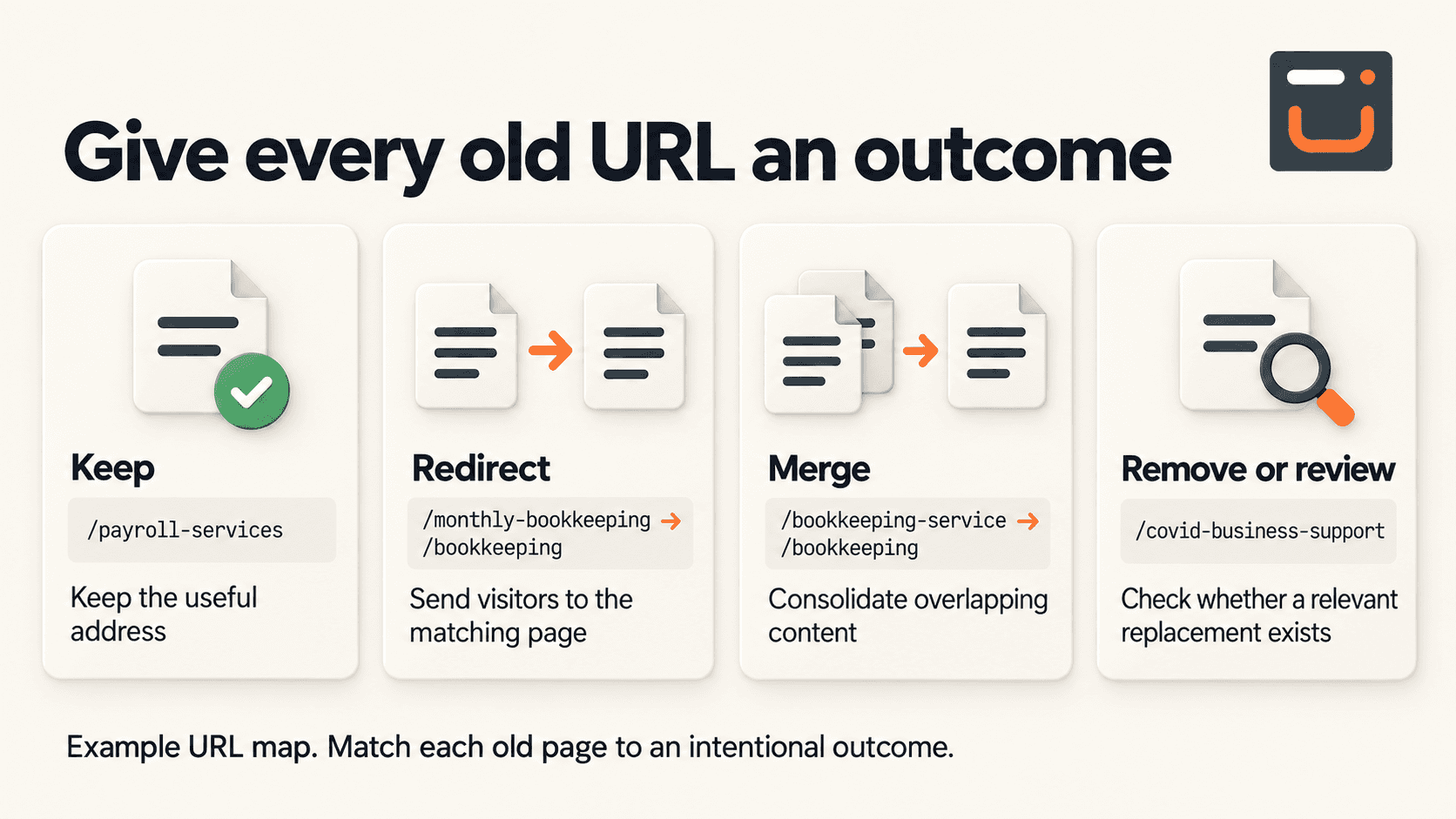
Current URL | New URL | Decision |
|---|---|---|
/payroll-services | /payroll-services | Keep |
/monthly-bookkeeping | /bookkeeping | Redirect |
/bookkeeping-service | /bookkeeping | Merge + redirect |
/covid-business-support | — | Remove/review |
/contact-us | /contact | Redirect |
Google recommends creating a mapping between current URLs and their new destinations before a move with URL changes. (developers.google.com) Every important old URL should have an intentional outcome. Not:
“The new website doesn't have that page anymore.”
If a relevant replacement exists, redirect it
Suppose:
Old: /services/payroll-management
New: /payroll
If the new page genuinely replaces the old one, use an appropriate permanent redirect. Google recommends server-side permanent redirects such as 301 or 308 for permanent moves. It also states that permanent redirects do not cause a loss of PageRank. (developers.google.com) The important part is relevance.
Do not redirect everything to the homepage
Imagine a company removes:
/industrial-boiler-maintenance
and the new website no longer offers boiler maintenance. Redirecting it to:
/
does not suddenly make the homepage a replacement for that service. Google specifically warns against sending many unrelated old URLs to one irrelevant destination such as the homepage, because this can confuse users and may be treated as a soft 404. (developers.google.com) If there is no meaningful replacement, removal with the appropriate 404 or 410 response may be more accurate.
Step 3: Do not accidentally remove the thing that made a page useful
URLs are only one part of the migration. Suppose the old product page contains:
detailed specifications
installation requirements
FAQs
application examples
technical PDF links
internal links from related products
The new design looks cleaner but reduces everything to:
Product image
80-word description
Request a quote
The URL stayed the same. But the page itself changed significantly. That is still a meaningful SEO/content change. Before rewriting important pages, compare:
OLD PAGE vs NEW PAGE
Look at:
topic/intent
important information
title
H1
supporting headings
useful copy
images/files
internal links
structured data
canonical setup
You do not need to preserve bad content just because it ranks. But important information should not disappear accidentally because it did not fit the new design.
Step 4: Update internal links instead of relying on redirects
Suppose you change:
/industrial-maintenance
to:
/services/industrial-maintenance
A 301 handles someone arriving at the old URL. But your own website should not keep linking internally to the old address forever. Google recommends updating internal links to point directly to the new URLs after a move. (developers.google.com) So:
BAD Service page → Old URL → 301 → New URL
BETTER Service page → New URL directly
Redirects are migration infrastructure. They should not become the new internal-link architecture.
Step 5: Check canonicals, hreflang and sitemaps
When URLs change, technical references to those URLs may also need changing. Google specifically recommends updating: Google: site moves with URL changes.
self-referencing canonicals
hreflang annotations where used
internal links
XML sitemaps
to reference the new URLs. (developers.google.com) For a typical small business site, hreflang may not apply. But canonicals and sitemaps usually deserve checking.
Step 6: Do not forget images, PDFs and downloads
A redesign often focuses only on webpages. But the old website may contain:
PDF brochures
technical documentation
images
product files
certificates
guides
videos
Google's migration guidance explicitly recommends including embedded content such as images and videos in migration planning. (developers.google.com) For an industrial manufacturer, losing:
/downloads/product-specification.pdf
may create a bigger customer problem than changing a marketing page. Inventory important assets too.
Step 7: Check that the staging website cannot accidentally become the problem
During development, staging sites are often protected with:
noindexrobots.txt restrictions
passwords/IP restrictions
That is normal. The dangerous part is carrying those rules onto production. Google lists forgotten noindex and robots.txt blocks among common site-migration mistakes that can prevent new pages from being indexed correctly. (developers.google.com) So before launch: Google: site moves with URL changes.
Staging: Can remain blocked
Production: Must use the intended indexing rules
Do not assume this was handled. Check it.
Step 8: Test the redirects before launch
Do not wait for customers or Google to discover broken mappings. Test:
OLD URL → EXPECTED NEW URL → 200 OK
Avoid:
OLD → 301 → OLD VERSION 2 → 301 → CATEGORY → 301 → FINAL PAGE
Google can follow redirect chains, but its migration guidance recommends redirecting directly to the final destination and keeping chains low. (developers.google.com) A crawler such as Screaming Frog can help test large redirect lists before launch.
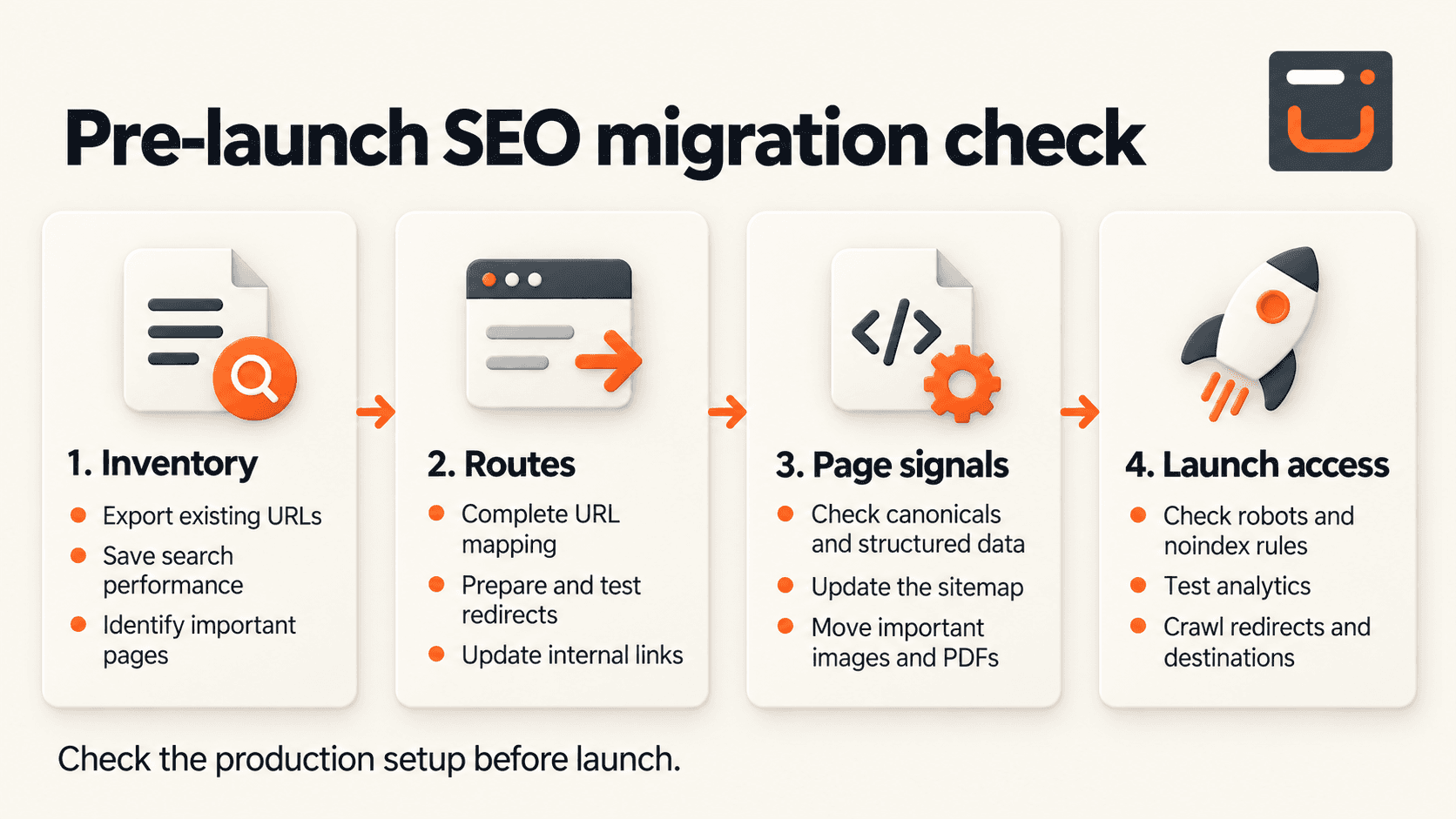
You do not personally need to implement every item. If you are the business owner, you need to know someone has.
What if the domain changes too?
A domain change adds another layer. For example:
oldcompany.com → newcompany.com
Google's Change of Address tool is specifically designed for moves from one domain or subdomain to another and should be used after the site has moved and redirects are in place. It is not used for ordinary path changes within the same domain, HTTP→HTTPS changes, or simply switching hosting without user-visible URL changes. (support.google.com) Google's 2026 documentation also says domain migrations should account for verified variants such as relevant www and other subdomains. (support.google.com)
If you are changing:
domain
CMS
URL structure
content
navigation
at the same time, recognize that Google now has much more to reassess. Where practical, reduce unnecessary simultaneous changes.
What if only the hosting changes?
That is different again. If:
example.com/service
remains:
example.com/service
and you are mainly changing servers, hosting provider or CDN, you do not need an old→new URL migration because users still see the same URLs. Google has separate guidance for hosting changes: prepare and test the new infrastructure, change DNS, monitor traffic/crawling, and shut down the old infrastructure once traffic has moved successfully. (developers.google.com) So before someone says:
“We're migrating the website.”
ask:
What exactly is migrating?
Launch day is not where SEO migration ends
Once the new site is live, monitor it. Search Console's URL Inspection tool can show what Google knows about individual pages and lets you test live URLs when investigating indexing problems. (support.google.com) Watch:
clicks
impressions
important pages
important queries
indexing
sitemap processing
404s
redirect errors
forms/conversions
unexpected traffic changes
Google says temporary search fluctuations are normal during significant URL moves while pages are recrawled and reindexed. Small-to-medium site moves can take a few weeks for many URLs to transition, while larger sites may take longer. (developers.google.com) Temporary movement does not mean:
Ignore every traffic drop.
It means compare what happened with what changed.
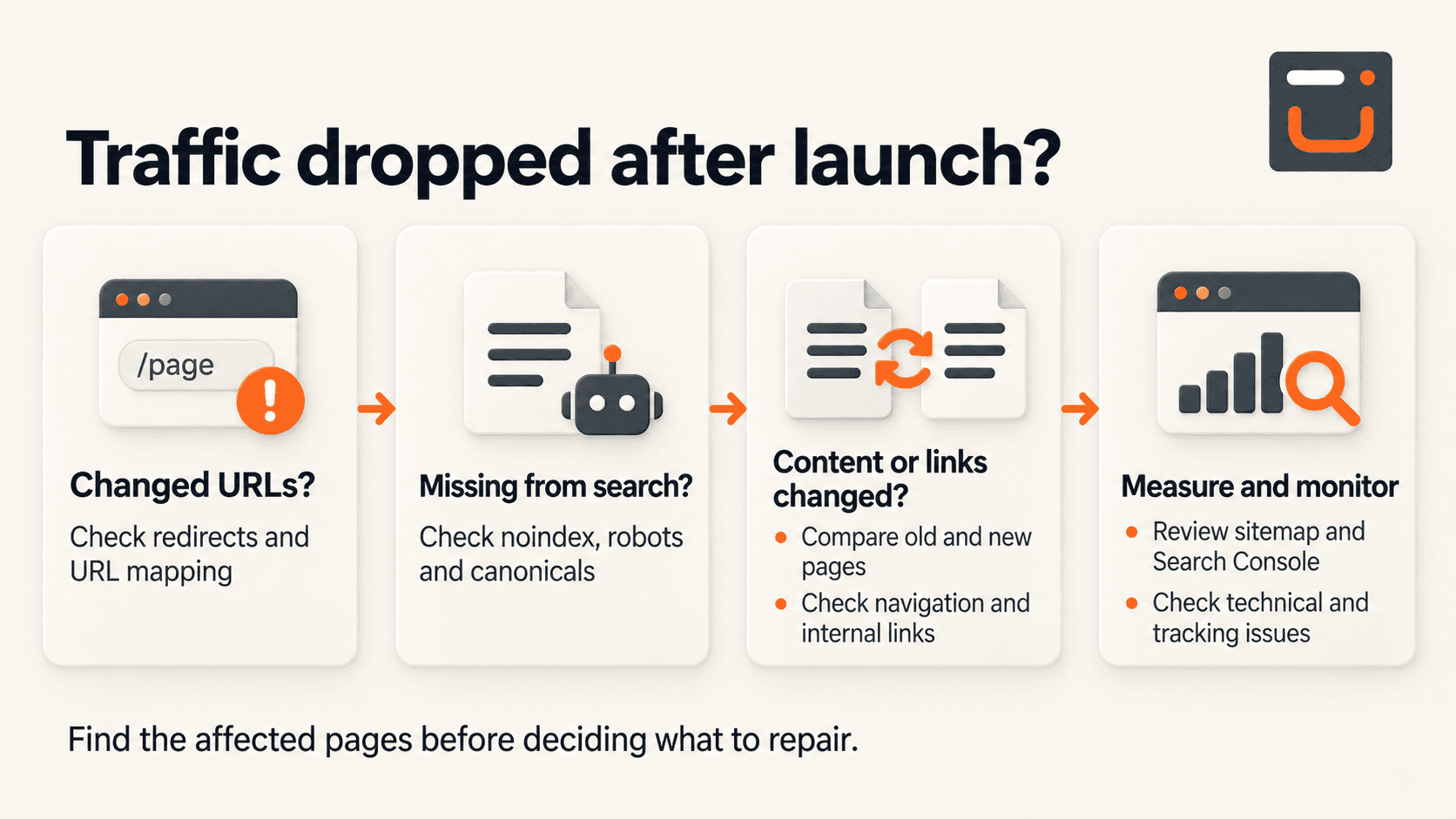
Do not immediately conclude:
Google hates the redesign.
Find the actual difference.
How long should redirects stay?
Google currently recommends keeping redirects in place for as long as possible and generally at least one year so signals from old URLs have enough time to move to their new destinations. From a user perspective, keeping useful redirects longer can also make sense. (developers.google.com) Do not clean them up three weeks after launch because:
“Google has probably seen them already.”
Before approving a redesign launch, ask these questions
You do not need to become an SEO specialist. Ask the team:
1. Which existing URLs are changing?
Get the list.
2. Which important URLs are staying exactly the same?
Not everything needs migration.
3. Where is the old → new URL map?
If URLs change, there should be one.
4. Which pages currently receive the most organic traffic?
Make sure the team knows.
5. Which pages are being merged or removed?
And what happens to their URLs?
6. Have internal links been updated?
Not only redirects.
7. Have canonicals, sitemap and indexing rules been checked?
Especially before launch.
8. Are important PDFs/images/files moving too?
Often forgotten.
9. Is Search Console ready for the new setup?
Especially if the domain changes.
10. Who monitors SEO after launch?
And for how long? Those answers tell you much more than:
“Yes, SEO migration is included.”
The goal is not to freeze the old website
A redesign exists because something needs improvement. You should be able to:
improve content
simplify structure
merge weak pages
change technology
add new services
improve navigation
remove outdated material
without treating every existing URL as untouchable. The objective is simpler: know what already has value before you change it. Then make each change deliberately:
Keep: when it still works.
Improve: when the page deserves to remain.
Merge: when several pages genuinely serve the same intent.
Redirect: when content has a relevant new home.
Remove: when it no longer belongs and no meaningful replacement exists.
Monitor: after the new website goes live.
A redesign should improve the website without accidentally resetting things the existing website spent years building.
Sources and further reading
Book your strategy call
Book your call now
Book your call now
Share
All Blogs
All Blogs & Articles







© 2026 Webshunya Studio®. All rights reserved.